Watercolor Back to School Dogs Clipart: A Practical Asset for Educators, Creators, and Small Business Owners
Watercolor Back to School Dogs Clipart is more than a themed design set—it’s a production-ready resource built for integration. Designed with intention, it bridges creative vision and real-world output across multiple platforms and physical products. Whether you’re preparing classroom materials in July, launching a back-to-school merch line in early August, or building digital content for an education-focused blog, this clipart set functions as a consistent, high-fidelity visual anchor.
What You Get—and Why Format Options Matter in Practice
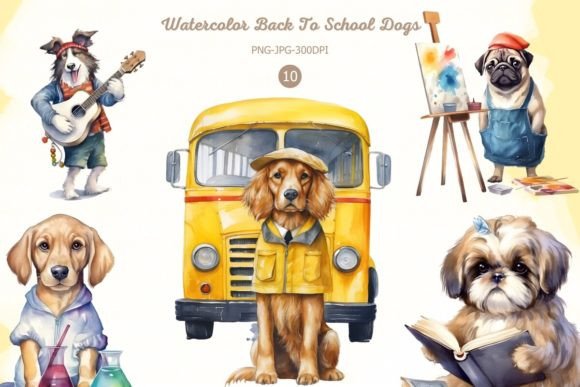
The set includes 10 original dog illustrations rendered in soft watercolor style—each animal holding a pencil, wearing glasses, or carrying a backpack, reinforcing the “back to school” theme without cliché. Crucially, each design ships in two formats: 10 PNG files with transparent backgrounds and 10 JPG files on white, all sized at 3000×3000 px (10″×10″ at 300 DPI). That resolution isn’t arbitrary. It ensures crisp scaling for large-format prints like posters or framed classroom art, while remaining manageable for web use when resized.
The dual-format delivery reflects real workflow needs. Transparent PNGs integrate cleanly into layered design tools—Adobe Photoshop, Canva, Affinity Designer—allowing you to place dogs over custom backgrounds, textures, or photo composites without manual erasing. White-background JPGs simplify direct use in print-on-demand dashboards, email newsletters, or slide decks where background consistency matters more than flexibility.
Compatibility That Fits Into Existing Production Systems
This isn’t just “clipart you download and hope.” Watercolor Back to School Dogs Clipart is engineered for compatibility across common production methods: sublimation, digital printing transfers, DTG (direct-to-garment), screen printing, and inkjet transfers. That means if your t-shirt business uses a Sawgrass sublimation printer, your local print shop runs DTG, or you’re hand-pressing tote bags via screen print—you’re not reworking files. No upscaling, no transparency fixes, no color profile guessing.
For educators using Cricut or Silhouette machines, the clean edges and high contrast make these designs ideal for vinyl cutting—especially when paired with a white or light-colored base material. For publishers creating printable planners or activity books, the 300 DPI resolution meets standard publishing requirements for both PDF and printed editions.
How It Fits Into Real Workflows—Before, During, and After
Before a project: Use the clipart during planning and asset sourcing. If you’re designing a back-to-school welcome kit for students, preview how each dog illustration pairs with your brand colors or typography before committing to layouts. Because there are 10 distinct designs—not variations of one—you can assign specific dogs to grade levels, themes (e.g., “Responsible Reader,” “Curious Scientist”), or even student groups, adding subtle personalization without extra illustration work.
During execution: Drop the PNGs directly into Canva templates for social media posts, Google Slides for parent meetings, or Adobe Illustrator for vector-based product mockups. The absence of watermarks means no last-minute cropping or pixel cleanup—just drag, resize, and export. For small business owners running Etsy shops, that translates to faster listing creation: upload a mug mockup, layer a dog design, adjust opacity for watercolor softness, and publish—all in under five minutes.
After launch: Reuse becomes strategic. One educator reported repurposing the same dog illustration across three touchpoints: a laminated classroom job chart (printed on white cardstock), a digital reward badge (PNG with transparency), and a fabric patch sewn onto student backpacks (sublimated onto polyester twill). Consistency across formats reinforced recognition—students associated the visual with responsibility and readiness, not just decoration.
Integration With Other Tools and Assets
These clipart files don’t exist in isolation. They work alongside tools you already use: Canva’s Brand Kit for consistent color application; Google Drive for shared folders with teaching teams; Airtable for tracking which designs go where (e.g., “Dog #4 → 3rd Grade Welcome Packet → Print + Digital”); or Printful’s dashboard for automated t-shirt fulfillment. Because they’re raster—not vector—you won’t edit individual brush strokes, but you can apply non-destructive filters (like duotone overlays in Photoshop) or blend modes (multiply for chalkboard-style integration) without quality loss.
If you pair them with complementary assets—a matching font bundle, editable lesson plan templates, or SVG borders—they become part of a system, not a one-off purchase. One freelance designer used the clipart as the visual core of a full “Back to School Toolkit” she licenses to schools: the dogs appear on editable certificates, editable name tags, and printable behavior charts—all sharing the same watercolor texture and scale logic.
Practical Tips for Long-Term Usability
- Organize by use case, not file type: Create folders labeled “Classroom Printables,” “Merch Designs,” and “Digital Content”—then copy relevant PNGs/JPGs into each. Avoid duplicating originals; instead, maintain a master folder with date-stamped backups.
- Test before bulk use: Print one design on your intended substrate (e.g., ceramic mug, cotton tee, kraft paper sticker) before ordering 50 units. Watercolor textures respond differently to dye-sub vs. DTG inks—what reads softly on screen may sharpen or mute in physical form.
- Preserve scalability: When resizing for smaller applications (e.g., 2″×2″ stickers), avoid going below 1500×1500 px. At 300 DPI, that still yields a sharp 5″×5″ print—but more importantly, keeps edge detail intact for fine watercolor granulation.
- Check color mode early: While RGB works for screens and most DTG workflows, switch to CMYK before sending files to traditional offset printers. Most design apps handle this automatically—but verify, especially if applying spot colors or Pantone matches later.
Consistency Without Repetition
Ten unique dogs mean variety without visual fatigue. Unlike generic clipart packs where every image feels like a clone, these share stylistic cohesion—same watercolor bleed, analogous palette range, consistent line weight—while offering clear distinction. That supports cognitive processing: learners or customers recognize the theme instantly, but don’t tune out from sameness. For marketers building seasonal campaigns, it allows A/B testing visuals (“Which dog resonates more with middle-school parents?”) without redesigning entire assets.
Quality Control Starts With the Source
No watermarks. No upscaled JPEGs masquerading as high-res. No mismatched DPI between files. That baseline reliability reduces QA time downstream. When a teacher uploads a dog PNG to a district-approved LMS platform and it renders clearly at 200% zoom, or when a POD platform accepts the file without auto-resampling warnings, the work was done upstream—not patched mid-process. That’s not convenience. It’s predictability baked into the asset itself.
Final Integration Note
Watercolor Back to School Dogs Clipart doesn’t replace strategy—it supports it. Whether you’re mapping out September lesson plans, prototyping a new product line, or refreshing your blog’s seasonal content calendar, having ten production-ready, cross-compatible, visually cohesive illustrations removes friction at the execution layer. That space you gain? Use it for refining messaging, testing engagement, or simply breathing before the school year begins.