Watercolor Back to School Background Set
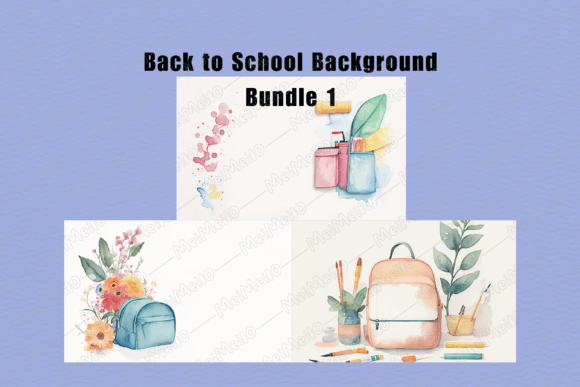
For educators designing classroom materials, small business owners launching seasonal offers, content creators building cohesive social media calendars, or homeschooling parents planning learning stations—the Watercolor Back to School Background Set serves as a quiet but effective workflow accelerator. It’s not a standalone solution, nor is it meant to replace strategy or teaching methods. Instead, it functions as a ready-to-deploy visual foundation: three high-resolution PNG files delivered in a single ZIP archive, designed to support consistency, save time, and reinforce tone across printed and digital touchpoints.
What You Receive—and What That Means for Your Workflow
You’ll receive one ZIP file containing three distinct watercolor-style background images. Each is saved as a PNG with transparent or soft-edged color fields—no clipping masks, no layered PSDs, no fonts embedded. This isn’t a design suite or template pack; it’s a set of clean, printable surfaces you control entirely.
Before extracting the ZIP, confirm your device can open compressed archives (most operating systems handle this natively). Once extracted, you’ll see three PNG files—each sized at 300 DPI and optimized for print clarity. No software subscription is required. No login, no license key, no recurring fee. Just immediate access to assets that integrate into tools you already use: Canva, Google Slides, Microsoft PowerPoint, Adobe Express, or even basic word processors like Word or Pages.
How It Fits Into Real Planning Cycles
Consider how the Watercolor Back to School Background Set aligns with common planning rhythms:
- Before launch: Use one background as the base layer when drafting welcome letters, syllabi, or orientation handouts. Its soft texture signals approachability without competing with text—helping readers focus on information first.
- During execution: Layer it beneath student name tags, weekly schedule grids, or behavior charts. Because it’s a static PNG, it prints predictably across sessions—no reformatting needed between Monday’s reading log and Friday’s reflection sheet.
- After implementation: Repurpose the same background in end-of-unit certificates or parent communication summaries. Visual continuity reinforces trust and professionalism—even when content changes.
This isn’t about decorative flair alone. It’s about reducing cognitive load during production so you spend less time adjusting opacity sliders and more time refining learning objectives or client messaging.
Compatibility and Practical Integration
The Watercolor Back to School Background Set works where you do—without friction. Since each file is a flat PNG, it imports cleanly into virtually any platform that accepts image uploads. In Canva, drag and drop it onto a blank canvas, then resize to fit standard paper dimensions (8.5" × 11", A4, or letter size). In Google Slides, insert it as a background image under “Slide → Change background” to maintain consistent framing across multiple slides.
For educators printing physical resources: these backgrounds scale without pixelation. They’re built for real-world output—not just screen display. That said, keep two practical variables in mind:
- Printer calibration: Inkjet and laser printers render watercolor textures differently. If precise color matching matters—for branded materials or school-wide handouts—run a test print on your target paper stock first.
- Paper choice: Matte cardstock softens contrast; glossy finishes intensify saturation. Neither is “wrong”—but knowing how your chosen medium interacts with the background helps avoid surprises during bulk printing.
No physical item ships. There’s no tracking number, no warehouse delay, no customs hold. You download, extract, and use—immediately. That makes this set especially useful when timelines tighten: last-minute bulletin board updates, urgent parent newsletters, or unexpected curriculum adjustments.
Print Flexibility Without Compromise
You can print as many copies as you need—no restrictions, no watermark, no usage caps. This isn’t licensed per seat or per classroom. Whether you’re preparing 12 student folders or 120 welcome packets, the same background retains its integrity. That scalability supports both lean operations (a solo tutor managing five families) and distributed teams (a district curriculum team rolling out resources across ten schools).
Because there’s no physical delivery, there’s also no inventory management, no shipping cost calculation, and no risk of damaged goods. You control versioning: save edited versions locally, label them by use case (“reading-log-bg”, “homework-tracker-bg”), and store them alongside related assets—lesson plans, rubrics, or editable templates—in a shared drive or local folder structure.
Long-Term Usability and Quality Control
These aren’t trend-dependent graphics chasing viral aesthetics. Watercolor textures have enduring appeal in educational and creative contexts because they balance warmth with neutrality—they don’t overwhelm, distract, or date quickly. That longevity means you can reuse elements across multiple school years, seasonal campaigns, or product iterations without visual fatigue.
To sustain quality over time:
- Store original PNGs separately from edited versions—never overwrite the source files.
- When adapting for accessibility, adjust text contrast against the background using built-in tools (e.g., Canva’s contrast checker or browser extensions like axe DevTools).
- If sharing with collaborators, include brief usage notes: “Backgrounds are print-ready at 300 DPI; best paired with sans-serif fonts for readability.”
There’s no expiration date on utility. Unlike subscription-based design libraries that rotate assets quarterly, this set remains yours—fully owned, fully portable, fully functional—regardless of platform updates or service discontinuations.
Where It Doesn’t Replace—And Where It Elevates
The Watercolor Back to School Background Set doesn’t write your lesson plan, grade assignments, generate analytics, or manage parent communications. It doesn’t automate workflows or replace pedagogical judgment. What it does is eliminate one small but cumulative friction point: the time spent sourcing, editing, licensing, and testing background visuals.
That time adds up. Five minutes here, ten minutes there—across dozens of documents, slides, or handouts—translates into hours reclaimed each semester. Hours you can redirect toward differentiation strategies, family outreach, curriculum refinement, or simply stepping away from the screen.
It also supports consistency without rigidity. You’re not locked into a brand palette or rigid grid system—you’re given flexible surfaces that adapt to your voice, your students’ needs, and your organization’s standards. A watercolor wash behind a minimalist checklist feels intentional. The same texture beneath a vibrant photo collage feels grounded. That versatility makes it relevant whether you’re building a Montessori-inspired learning journal or designing a back-to-school email sequence for your freelance editing business.
Finally, it respects your autonomy. You decide how much—or how little—to customize. You choose when to use it, how to combine it, and what purpose it serves in your specific context. No onboarding, no tutorials, no forced integrations. Just three files, ready when you are.